Hello everyone,
Today, I will guide you through implementing Ant Design (AntD) in a Next.js 14 application.
Recently, while working on a client project using Next.js 12 and AntD 4.20.2, I faced performance issues. Upgrading to Next.js 14 improved the app’s speed significantly.
Next.js 14 comes with many fantastic updates—you can check them out on the official Next.js blog.
⚠️ The AntD CSS Issue in Next.js 14
One major issue I encountered was that AntD’s CSS was loading after the page rendered, causing a flash of unstyled content (FOUC). After extensive research, I found the solution in the official Ant Design documentation.
🛠️ Step-by-Step Guide to Implement AntD in Next.js 14
📌 Step 1: Create a New Next.js 14 Application
npx create-next-app@latest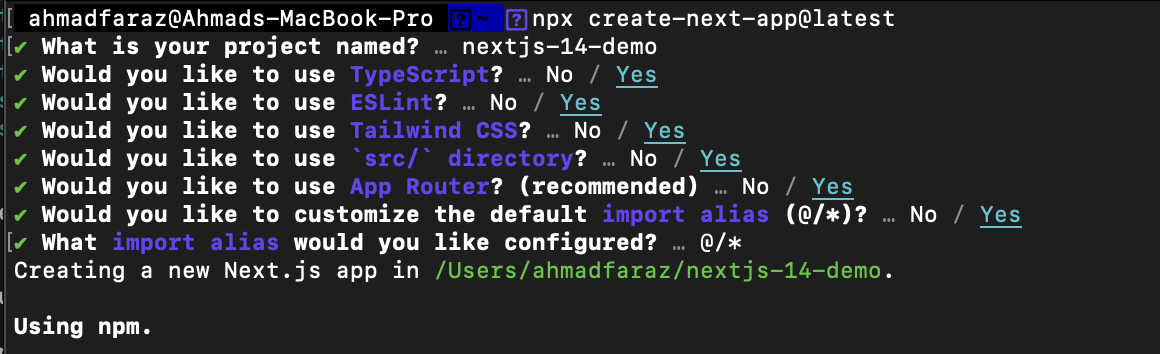
📦 Step 2: Install Ant Design
npm install antd📦 Step 3: Install @ant-design/cssinjs
npm install @ant-design/cssinjs📂 Step 4: Create AntdRegistry Component
Create a new file: src/lib/AntdRegistry.tsx
'use client';

import React from 'react';
import { createCache, extractStyle, StyleProvider } from '@ant-design/cssinjs';
import type Entity from '@ant-design/cssinjs/es/Cache';
import { useServerInsertedHTML } from 'next/navigation';

const StyledComponentsRegistry = ({ children }: React.PropsWithChildren) => {
  const cache = React.useMemo<Entity>(() => createCache(), []);
  const isServerInserted = React.useRef<boolean>(false);
  useServerInsertedHTML(() => {
    // avoid duplicate css insert
    if (isServerInserted.current) {
      return;
    }
    isServerInserted.current = true;
    return <style id="antd" dangerouslySetInnerHTML={{ __html: extractStyle(cache, true) }} />;
  });
  return <StyleProvider cache={cache}>{children}</StyleProvider>;
};

export default StyledComponentsRegistry;
📝 Step 5: Update layout.tsx File
Modify the layout.tsx file to include the AntD registry:
import React from 'react';
import { Inter } from 'next/font/google';

import StyledComponentsRegistry from '../lib/AntdRegistry';

import '@/globals.css';

const inter = Inter({ subsets: ['latin'] });

export const metadata = {
  title: 'Create Next App',
  description: 'Generated by create next app',
};

const RootLayout = ({ children }: React.PropsWithChildren) => (
  <html lang="en">
    <body className={inter.className}>
      <StyledComponentsRegistry>{children}</StyledComponentsRegistry>
    </body>
  </html>
);

export default RootLayout; Ahmad Faraz
Leave a comment